
Early Access
11LAB CRM is football scouting software for clubs
One workspace for the sporting department. Sporting directors, heads of recruitment, scouts and analysts move each candidate from first interest to final decision
One scouting pipeline
How does 11LAB CRM organise club scouting?
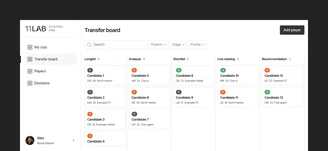
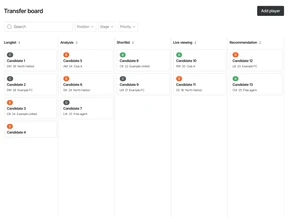
In 11LAB CRM, every candidate moves through a five-stage scouting pipeline on the Transfer board: Longlist, Analysis, Shortlist, Live viewing and Recommendation
-
Longlist
Every player the club has flagged as a possible target
-
Analysis
Candidates under closer review by scouts and analysts
-
Shortlist
The narrowed list of priority targets
-
Live viewing
The live scouting stage: watching the player in person
-
Recommendation
Candidates put forward to the club’s decision makers
Every candidate has a stage, a priority, a next step and a responsible person
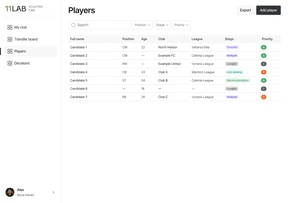
All players in one place
Can 11LAB CRM replace scouting spreadsheets?
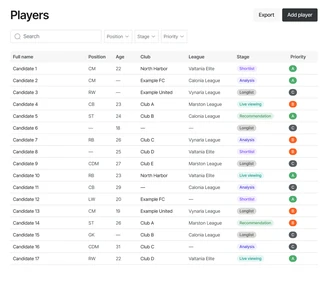
Yes. In 11LAB CRM, every candidate sits in the Players section: one shared scouting database for the whole sporting department. Sporting directors, scouts and analysts work from the same list instead of separate spreadsheets
-

Search
Find any candidate in the club’s database
-
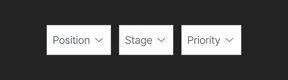
Filters
Narrow the list by position, stage and priority
-
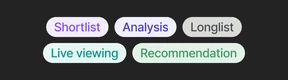
Stages
See where each player sits in the pipeline
-

Priorities
Rank every target as A, B or C
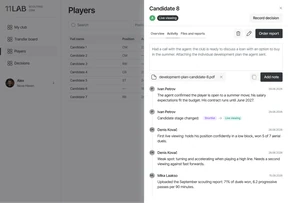
Every player has a history
How do clubs track every Live viewing, note and report?
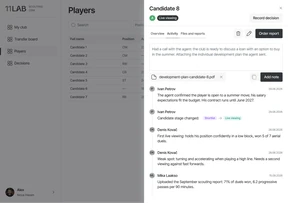
Every player card in 11LAB CRM has an Activity tab with the full history of work on that candidate. Files and 11LAB Intelligence reports sit in the same card, not in chats, inboxes and personal folders
-
Notes
Scouts’ observations on the player
-
Comments
Team discussion around the candidate
-
Stage changes
Moves on the Transfer board
-
Live viewing
Records from watching the player live
-
Files
PDFs, spreadsheets, documents and images attached to the player
-
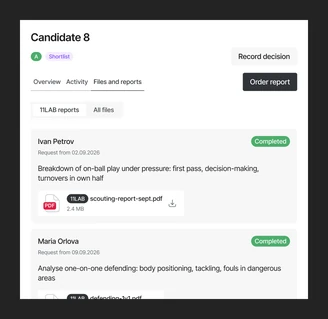
11LAB Intelligence reports
Ordered from the player card and kept in Files and reports
-
Action history
Every action taken on the player card

From scouting to decision
How do clubs record the final decision on a player?
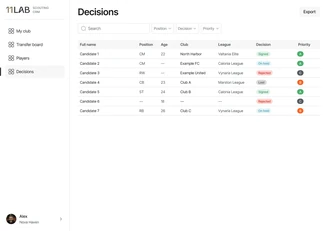
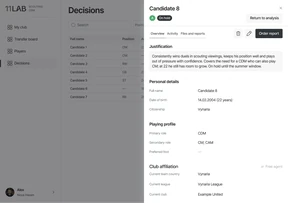
In 11LAB CRM, every scouting decision gets one of four statuses: Signed, On hold, Lost or Rejected. The player then moves to Decisions and can return to the pipeline if needed
Record decision
Choose one of four statuses and write a justification
- Signed
- On hold
- Lost
- Rejected
Return to analysis
If the situation changes, bring the player back into the pipeline
Intelligence + CRM
How do 11LAB Intelligence and 11LAB CRM work together?
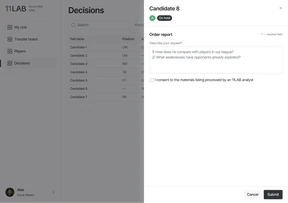
11LAB Intelligence helps evaluate players, and 11LAB CRM is where the club manages candidates and records decisions. 11LAB Intelligence reports are ordered from the player card and stay next to the candidate’s notes and history
11LAB Intelligence
Player performance & fit evaluation
11LAB CRM
Candidates & decisions
Early Access
Football scouting software built with clubs
11LAB CRM is in Early Access. Clubs that join now use it in their day-to-day scouting and help shape what gets built next
-
Transfer board
Every candidate by stage, from Longlist to Recommendation
-
Players
The club’s shared scouting database with search, filters and A/B/C priorities
-
Activity
The complete history of work on each player, in the player card
-
Decisions
Every final outcome with its justification
-
11LAB Intelligence reports
Reports on your candidates, kept with their history
FAQ
Questions about 11LAB CRM
What software do football clubs use for scouting?
Can we just use Excel or Google Sheets for scouting?
What happens to our scouting knowledge when a scout leaves the club?
How do clubs keep a record of why a player was signed, put on hold or passed on?
Does 11LAB CRM replace scouting data platforms?
Is there scouting software built for football clubs?
Is there a football scouting app for clubs?
Bring your scouting process into one system
See how the Transfer board, Players and Decisions in 11LAB CRM would fit your club’s scouting work. Join Early Access or book a demo